Limited-Time 30% OFF!Get Offer
Category: GuidesSee the structure

H3 Max prompt guide

A useful H3 Max prompt decides four things: who is doing what, how the camera looks at it, when it happens inside the clip, and what we should hear. A stack of mood words — cinematic, epic, masterpiece — names a feeling and leaves those four decisions empty.

Structure

A structure you can copy

Write the shot as events, not as a still. If the clip runs eight seconds, the action on screen should also last about eight seconds. If you care about sound, say where it comes from; otherwise the model will invent a score you never asked for.

Use this order below. You do not need field names — write it as ordinary sentences, then fill in a blank start:

Prompt ideas that work are specific events, not a longer list of adjectives. A 5-second draft can be shorter: one visible action plus one audible source. Add timing when the clip is long enough to hold two beats.

Six layers, one prompt

1Subject 2action. The camera 3move, distance, speed. 4Timing beats. On-camera sound: 5sources. 6Limits.

  1. SubjectWho or what is on screen, with one or two appearance details that can be repeated.
  2. ActionThe event that changes during the clip, written as verbs.
  3. CameraType, distance, and speed of the move.
  4. TimingWhen each beat happens, inside the 5–15 seconds you pick in the generator.
  5. SoundSources we should hear, plus quoted dialogue if anyone speaks.
  6. LimitsWhat must not appear: extra score, a second location, a cut.
H3 Max prompt examples

Rewrite a weak line, then write the action as an event

One scene rewritten line by line, and one process written as something that happens over time.

Weak line

Cinematic video of a beautiful musician, epic lighting, 8k, masterpiece, highly detailed.

Rewritten for an 8-second clip

A woman in a rust-red coat plays violin under a station clock on a rainy platform. The camera dollies in slowly from a wide shot of the empty platform to a medium shot of her bow hand. 0–3s: she lifts the bow. 3–8s: the first phrase rings out as a train slides past behind her. On-camera sound: bow on strings, rain on the canopy, a distant station announcement. No extra score.

Suggested wording.

What changed
Subject
a woman in a rust-red coat, under a station clock
Action
lifts the bow, then plays
Camera
a slow dolly in, wide to medium
Timing
0–3s lift, then 3–8s the phrase — two beats inside an 8-second clip
Sound
three on-camera sources
Limits
no extra score
Look for
  • One continuous move, not a cut to a new setup
  • Rain and the announcement still audible under the violin
  • The train staying in the background instead of replacing her
  • If a lush orchestra appears, change only the sound layer on the next take

Write the action as an event

Name the thing that moves. Adjectives about beauty do not tell the model what happens between second one and second five.

Full prompt

Macro shot of espresso pulling from a chrome portafilter into a warm glass, thick golden crema blooming and swirling. Bright morning light through a cafe window, steam curling, water spots on the chrome, a few coffee grounds on the tray. 100mm macro, shallow focus, slight handheld drift. Sound: grinder winding down, the hiss of the pump, liquid pattering into glass, cafe chatter behind.

Why this structure
The liquid is the event. Crema blooming, steam curling, and pattering into glass are things that occupy time. The sound line names sources in the same room.
Look for
The stream thickening, crema forming, steam, and the pump hiss under cafe chatter. If the cup sits still with no pour, rewrite the action verbs before you touch the camera.
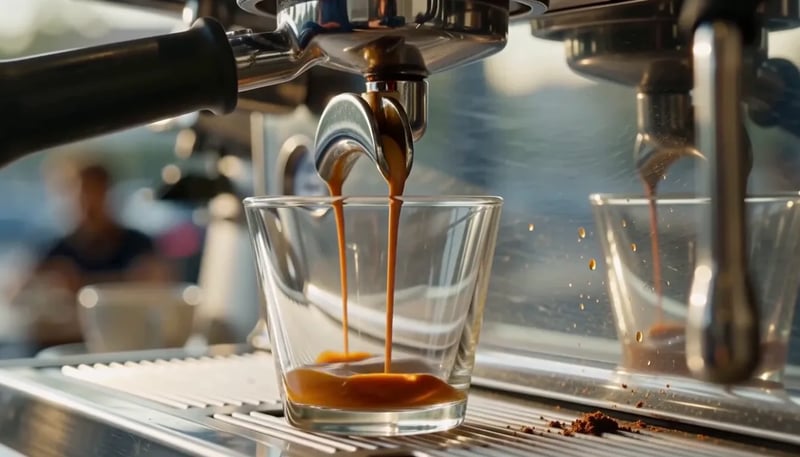
Espresso pulling from a chrome portafilter into a glass, crema blooming — published MiniMax H3 Max demo
Source: MiniMax H3 Max demo.
Already on this site

Why a homepage demo prompt works, and how to start from a still

One clip shows the four layers already in place. The other shows what a start frame does for you, and what the prompt still has to do.

Why a homepage demo prompt works

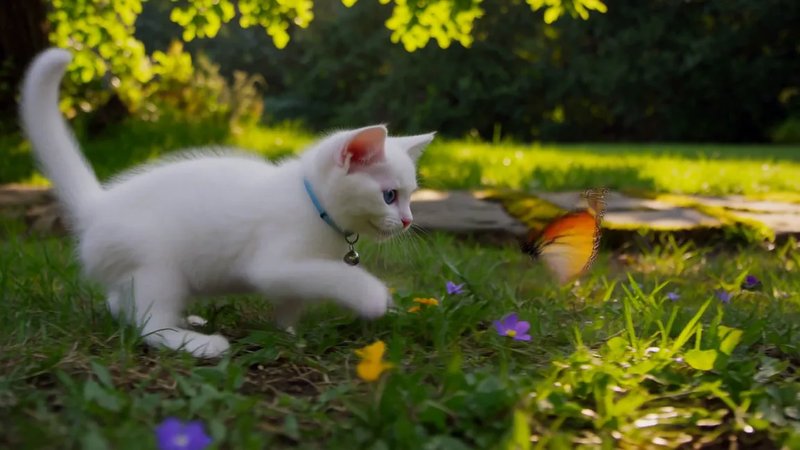
The homepage already shows finished takes. One of them is a single sentence:

Full prompt

A white kitten chases a butterfly across a sunlit garden. Gentle camera tracking, natural movement, soft afternoon light filtering through the leaves.

What is already there
A subject (white kitten), an action (chases a butterfly), a camera move (gentle tracking), and a light source (soft afternoon through leaves).
What you would add if you need sound
Garden birds, wing beats, or “no extra score.” Copy the shape — subject, action, camera — then add the missing layer instead of pasting the sentence as a second gallery.
See it on the homepage
White kitten chasing a butterfly in a sunlit garden — from this site's homepage showcase
Source: homepage showcase.

Start from a still

When you upload a start frame, the still holds appearance and framing. The prompt should write motion, camera, and sound — not re-describe the face or the dress as if you had no picture.

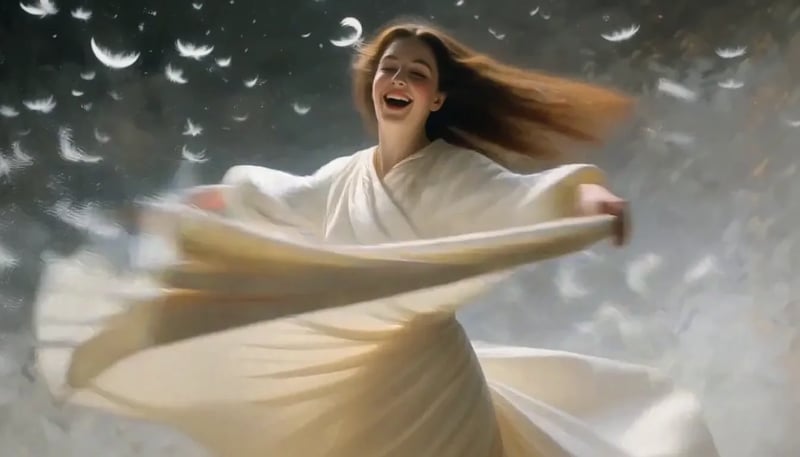
This clip starts from a still of a woman in ivory silk, then asks for a spin:

Full prompt

She spins. A woman in flowing ivory silk turns hard through a violent updraft of white feathers, her skirt flaring wide and heavy as it whips around her legs, sleeves snapping like sails. She throws her head back, hair breaking loose from its pins and streaming sideways, then drops her chin and opens her eyes — laughing.

Why this structure
The first two words name the event. Skirt, sleeves, hair, and feathers are motion, not a new identity. The still already supplies the look.
Look for
The same woman and dress, a continuous spin, feathers responding to the turn. If the face changes, a suggested next edit is to restate the still's look and simplify the spin.

The homepage talking-portrait clip uses the same split: the photo holds the face, the prompt hands her a quoted line. An optional end frame is only useful when you already know the landing pose; the prompt then describes the path between the two pictures, not a second story.

A woman in ivory silk spinning through white feathers — published MiniMax H3 Max demo
Start frame of a woman in ivory silk, before the prompt adds a spin — published MiniMax H3 Max demo
Start frame
Source: MiniMax H3 Max demo.
Camera and sound

Write the camera as an action, and write what we should hear

The camera is a move with amplitude and speed, not a mood word. Sound needs named sources — dialogue goes in quotes with a tone.

Write the camera as an action

Write the camera as a move, not as a mood. Name the type, how far it travels, and how fast: a slow dolly in from a wide platform to a medium shot of the bow hand; a gentle track beside a running figure; a static hold if nothing should drift.

On Turbo and on MiniMax H3 Max, that sentence is the only camera control — including image-to-video. Dolly in, Dolly out, and Crane up appear only after you switch the model to MiniMax H3 Max Multi-angle, and only when you start from a still. If you stay on the default model, do not look for those three buttons.

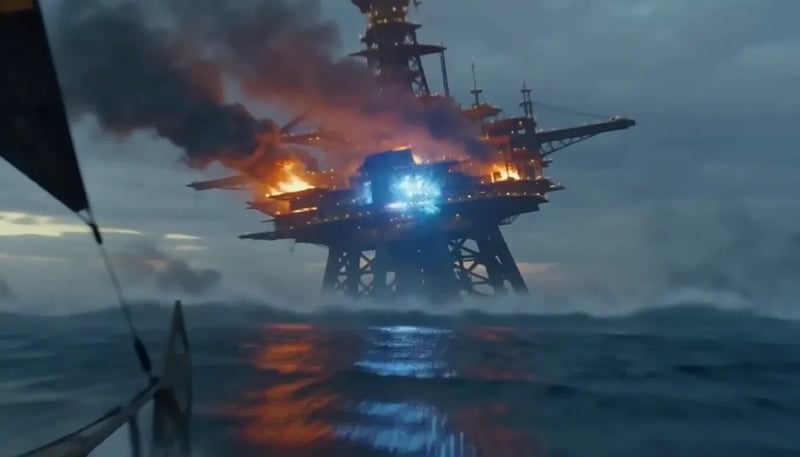
This clip writes a 15-second continuous track in the prompt:

Prompt excerpt

ACTION, ONE CONTINUOUS TAKE, single unbroken handheld tracking shot, NO cuts, 15 seconds. 0:00-0:05 Medium-Wide on the pilot: camera tracks alongside the skiff… 0:05-0:10 continuous zoom-in / tilt up… 0:10-0:15 Extreme Close-Up on the collapsing rig… AUDIO (NO MUSIC): deep structural groan of failing steel, the hiss and slap of water under the hull, tearing-metal screech from above…

Why this structure
The camera is an action with amplitude and speed. The three beats sit inside a 15-second take. “No music” is a limit, not a mood word.
Look for
One unbroken move, three beats that land where the timestamps put them, metal and water instead of a score. If the clip cuts to a new setup, simplify to one move before you add more events.
One continuous handheld tracking shot with timed beats and no music — published MiniMax H3 Max demo
Source: MiniMax H3 Max demo.

15-second take

Source: MiniMax H3 Max demo.
  1. 0:000:05

    Medium-Wide on the pilot: camera tracks alongside the skiff

  2. 0:050:10

    Continuous zoom-in / tilt up

  3. 0:100:15

    Extreme Close-Up on the collapsing rig

Write what we should hear: dialogue

Name sources. Put spoken lines in quotes and add a tone. If you want the room quiet, say “no extra score.”

Full prompt

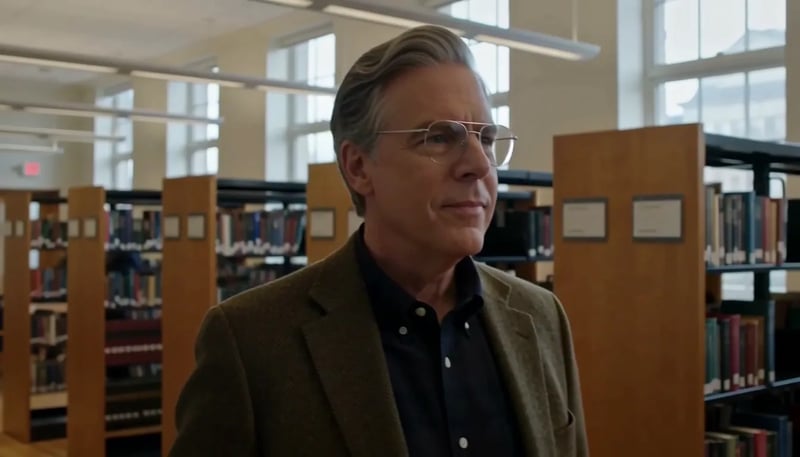
Create a 5-second live-action Hollywood film shot in a bright university library. A thoughtful professor stands in a medium shot, turns slightly toward an unseen student, and calmly says, ‘What is the real?’ Natural daylight, professional cinema camera, realistic performance, subtle camera drift, no close-up, no dark lighting, perfect lip sync.

Why this structure
The quote is the event. “Calmly” is the delivery. Subtle camera drift is a small move that does not fight the line.
Look for
The spoken sentence matching the mouth, a quiet library under the voice, no sudden close-up. If a score appears, add “no extra score” and leave the line alone on the next take.
A professor delivers a quoted line to camera in a library — published MiniMax H3 Max demo
Source: MiniMax H3 Max demo.

Write what we should hear: sound beyond dialogue

Dialogue is not the only sound layer. This prompt writes the room around a line:

Prompt excerpt

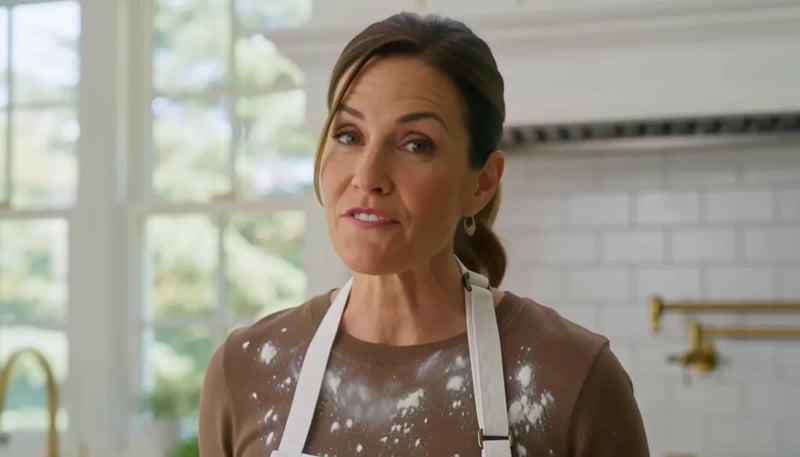
A chef in her forties looks straight into the camera in a bright open kitchen and says, ‘The secret is you never crowd the pan.’ She smiles and turns back to the stove. … Sound: her voice close and clear, a gentle sizzle, a knife on a board off screen.

Look for
The sizzle and the off-screen knife under the voice. If the kitchen is silent except for music, rewrite the sound line before you change the recipe.
A chef speaks to camera in an open kitchen with a sizzle and an off-screen knife on a board — published MiniMax H3 Max demo
Source: MiniMax H3 Max demo.

When to write the camera, when to pick a preset

Prompt the move on MiniMax H3 Max or Turbo, or upload a still and choose Dolly in, Dolly out, or Crane up.

Time

Time is a budget

Pick a duration in the generator, then put each beat inside that window. Five seconds holds one action. Fifteen seconds still should not hold ten.

Put the limit in the first two words

Full prompt

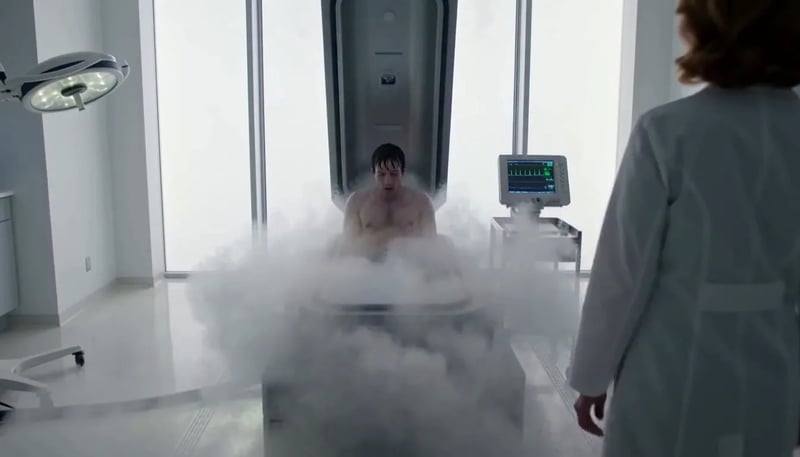
Exactly 5 seconds. Inside a bright sterile laboratory, a cryogenic chamber opens and cold vapor spills across the floor. A confused man slowly sits up. A scientist steps forward and says, ‘Welcome back.’ The man asks, ‘What year is it?’ The scientist hesitates as the camera gently pulls backward.

Why this structure
One opening, two short lines, one pull-back. Nothing else is asked to happen.
Look for
Vapor, sit-up, two lines, and the camera receding — all inside five seconds. If a third location appears, cut an event rather than stretching the duration in the prose while the control still says 5.

The homepage warrior-monk sentence uses a 0–4s beat plus a camera rise. That 0–4s is one segment inside the clip, not a duration you can select. Keep beats inside the 5–15 seconds you pick; you do not have to make every timestamp add up to the full length.

A cryogenic chamber opens in a five-second prompt with two lines of dialogue — published MiniMax H3 Max demo
Source: MiniMax H3 Max demo.
Fix one thing at a time

If the clip is wrong, change one layer

Do not rewrite the whole brief. This table is a suggested order of edits, not a success rate.

  • Frozen subject, no event

    Change next
    Action verbs and timing
    Leave alone
    Camera adjectives
  • Face or clothes drift

    Change next
    Repeat appearance, or start from a still
    Leave alone
    A second location
  • Wrong or missing sound

    Change next
    Name sources; add “no extra score” if needed
    Leave alone
    Duration
  • Too many events

    Change next
    Cut to one action; shorten the control
    Leave alone
    Resolution
  • Camera ignores the sentence

    Change next
    Restate type, distance, and speed
    Leave alone
    Dialogue
  • Default image-to-video has no Dolly in button

    Change next
    Write the move in the prompt, or switch to MiniMax H3 Max Multi-angle
    Leave alone
    The start frame

Settings that change the take

Pick length in the generator: 5 to 15 seconds in whole seconds. Beats in the prompt sit inside that window; they do not have to add up to it. Choose 480P, 768P, or 1080P — 480P to hunt the shot, 768P for most keepers, 1080P when you want the higher-credit finish.

The generator starts on Turbo; switch to MiniMax H3 Max for the take you will keep. Switch to MiniMax H3 Max Multi-angle only when you want Dolly in, Dolly out, or Crane up on an image-to-video shot. Those three buttons are not on Turbo or MiniMax H3 Max.

The same prompt can move between Turbo and MiniMax H3 Max. See what a take costs on the pricing page.

Next from here

Where this H3 Max prompt guide goes next

This page is for writing a 5–15 second prompt. Camera movement has its own job. Turbo is the cheaper lane for the same wording.

Camera prompts and Multi-angle presets

A person walking toward the lens is not the same shot as the camera moving toward a still person. Write the camera as its own sentence: the type of move, how far it travels, and how fast.

On this site you can prompt that move on MiniMax H3 Max or Turbo, or upload a still and pick Dolly in, Dolly out, or Crane up on MiniMax H3 Max Multi-angle. Those three cards are fixed paths. A pan, a zoom, a follow, or any other move still belongs in the prompt.

Explore camera controls
Camera prompts and Multi-angle presets

MiniMax H3 Max Turbo

The same four-layer prompt can run on Turbo. Use that lane while the opening is still in play: more versions of the same wording, 5 to 15 seconds, sound already in the file.

When a take is the one you would keep, switch the model to MiniMax H3 Max and run the wording again. Turbo is not a quality ranking against Max; it is the draft lane for the same prompt.

Run this prompt on Turbo
MiniMax H3 Max Turbo
FAQ

Before you write the next prompt

Try this prompt on a short clip

Once the four layers are on the page, run the take. Change one layer if the clip misses. This site's generator makes 5 to 15 second clips from a sentence or a still; it does not run H3 Max Director sessions.